> For the complete documentation index, see [llms.txt](https://docs.revunity.com/llms.txt). Markdown versions of documentation pages are available by appending `.md` to page URLs; this page is available as [Markdown](https://docs.revunity.com/our-products/victory/victory-information.md).
# Victory Information
## What is Victory?
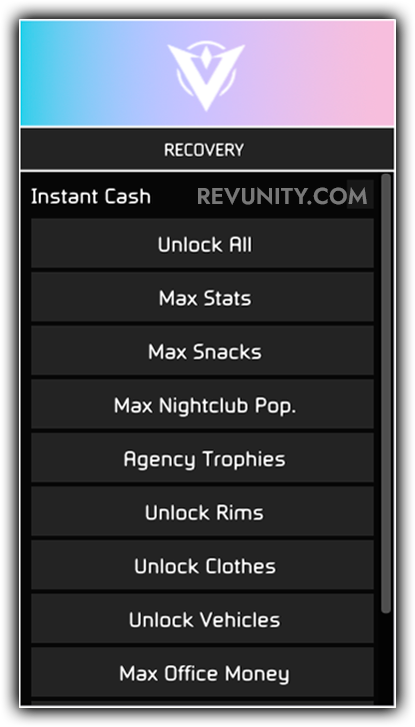
With Victory, you’ll have access to an extensive range of features that allow you to customize your gameplay experience in countless ways. Want to spawn any vehicle you can imagine, including ones that are normally unobtainable? With Victory, you can. Want to teleport to any location on the map instantly? That’s no problem with Victory. Want to customize your character’s appearance, give them new abilities, and unlock all sorts of special items? Victory has got you covered.
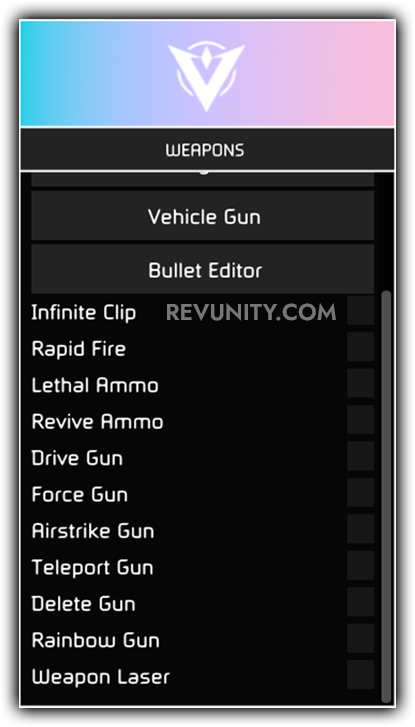
But that’s just the beginning. With Victory, you can also adjust a variety of in-game settings, including things like weather, time of day, and even the density of pedestrians and traffic. You can spawn objects and characters, modify the properties of vehicles and weapons, and more!
All of these features are available in a sleek, user-friendly interface that makes it easy to navigate and customize your experience. And with regular updates and a dedicated support team, you can be confident that Victory will continue to deliver new features and improvements over time.
So whether you’re looking to enhance your single-player experience, dominate in multiplayer, or just have some fun exploring all the possibilities of GTA 5, Victory is the mod menu for you. Get started today and experience the game like never before.
## Feature List
N/A
## Victory Images
## Showcase \[EN]
Coming Soon!
## :desktop: Compatibility
Windows 10 Compatible: ✔
Windows 11 Compatible: :warning:
{% hint style="info" %}
Note: The menu may be untested on Windows 11 and therefore be unstable or not work as intended.
{% endhint %}
 What is Victory?
With Victory, you’ll have access to an extensive range of features that allow you to customize your gameplay experience in countless ways. Want to spawn any vehicle you can imagine, including ones that are normally unobtainable? With Victory, you can. Want to teleport to any location on the map instantly? That’s no problem with Victory. Want to customize your character’s appearance, give them new abilities, and unlock all sorts of special items? Victory has got you covered.
But that’s just the beginning. With Victory, you can also adjust a variety of in-game settings, including things like weather, time of day, and even the density of pedestrians and traffic. You can spawn objects and characters, modify the properties of vehicles and weapons, and more!
All of these features are available in a sleek, user-friendly interface that makes it easy to navigate and customize your experience. And with regular updates and a dedicated support team, you can be confident that Victory will continue to deliver new features and improvements over time.
So whether you’re looking to enhance your single-player experience, dominate in multiplayer, or just have some fun exploring all the possibilities of GTA 5, Victory is the mod menu for you. Get started today and experience the game like never before.
##
What is Victory?
With Victory, you’ll have access to an extensive range of features that allow you to customize your gameplay experience in countless ways. Want to spawn any vehicle you can imagine, including ones that are normally unobtainable? With Victory, you can. Want to teleport to any location on the map instantly? That’s no problem with Victory. Want to customize your character’s appearance, give them new abilities, and unlock all sorts of special items? Victory has got you covered.
But that’s just the beginning. With Victory, you can also adjust a variety of in-game settings, including things like weather, time of day, and even the density of pedestrians and traffic. You can spawn objects and characters, modify the properties of vehicles and weapons, and more!
All of these features are available in a sleek, user-friendly interface that makes it easy to navigate and customize your experience. And with regular updates and a dedicated support team, you can be confident that Victory will continue to deliver new features and improvements over time.
So whether you’re looking to enhance your single-player experience, dominate in multiplayer, or just have some fun exploring all the possibilities of GTA 5, Victory is the mod menu for you. Get started today and experience the game like never before.
## 
 Showcase \[EN]
Coming Soon!
## :desktop: Compatibility
Windows 10 Compatible: ✔
Windows 11 Compatible: :warning:
{% hint style="info" %}
Note: The menu may be untested on Windows 11 and therefore be unstable or not work as intended.
{% endhint %}
Showcase \[EN]
Coming Soon!
## :desktop: Compatibility
Windows 10 Compatible: ✔
Windows 11 Compatible: :warning:
{% hint style="info" %}
Note: The menu may be untested on Windows 11 and therefore be unstable or not work as intended.
{% endhint %}